Can Students and Teachers Create a Green School?

Howzit?

For the introduction to an environmental science unit based on the positives and negatives of “going green,” students will be assigned to find green projects that can be completed on their campus. They will explore the different green projects as groups, and create presentations that explain, demonstrate, or outline the projects they choose, and why they are good project ideas for the school. They will begin by doing a introduction and kick off to the project by viewing a presentation on TED-Ed that will serve as an example and motivator of green projects. They will then be split into groups to begin research on green projects, and discuss the positives and negatives of the projects they research. They will use the Discord server  in order to share and discuss their research in their private group channels I will create for them. They will use their research in order to narrow down the project choices until their group has decided on a project. They will then create a presentation on the project they chose to use in a proposal. Their presentations will be showcased in a business-like proposal campus faculty and staff. If their project is approved it will be implemented at the school and used to teach future units as part of the lesson plans. This design will engage students, and encourage them to take an active roll in their education. The project will combine environmental science, art, speech, and business/economics. This project also combines technology with project based learning(PBL), in order to engage students and prepare them for creating useful presentations in their future jobs. I created an example of a digital story, a media they may include in their presentation, to give a better idea of a green project that can be used as a PBL unit. There are also a few examples of green projects that can be incorporated as projects for PBL in a school setting on the blog already, and I will continue to post more as I find them.

Until next time!

We Have A Discord!

Howzit?

I am creating a Discord server for the community here and for future use with students. It is still a work in progress, but I thought I would share a quick Discord tutorial on how to create and join new servers. Below is a video on how to do so. I will also include a link to join the server. It is still a work in progress and will change as needed with the community. If you would like to join or give feedback please feel free to do so.


The link/code to join the server is https://discord.gg/TuKcFPd


In the future I plan to use this Discord server as a hub for my classrooms. I will require students to join the server, and will sort them all by class and groups. I will have every student create an account at the first class, and join the server. I will then assign them each their own roles within the server based on their class, and group within the class. They will use the class channels to share, collaborate, and learn as a whole class, myself included. They will use their group channels to work specifically with their assigned group on their group projects. They will be able to share pictures, files, videos, websites and more in the respective channels. I will also create a private submission channel where they can send anything they want to it, (assignments, complaints, concerns, questions, etc.) but only I will be able to view and read the things sent to the channel. This will allow for a sort of “anonymous” area for them to contact me at anytime without classmates or anyone else knowing about it. This will also server as a record log of everything they send me.

The beauty of Discord is that I can make private channels for each class, and only members of that class can see them. This way it keeps only relevant channels in everyone’s sight, and removes clutter. I plan to use it as a platform for group projects, discussion, and an easy way to contact each other outside of the classroom. Since it has web, desktop, and mobile apps that are all integrated, everyone who joins can be connected to the server at all times. I will also incorporate public channels that show off each classes work, allowing for feedback from their peers, family, and the community. Since the server is a work in progress, and the only one who can see every channel will be me, some of you may be curious as to how it is working. I will encourage the community, as well as my students, to ask questions about Discord in order to maximize its potential as an online classroom and community hub. I will readily share what the server looks like from my end, as well as create more tutorials as needed. I look forward to using it as a location for students to share and collaborate with each other in order to bring their knowledge and skills to new heights.

Introductory Podcast

Howzit everyone?

I created this short podcast to introduce the concept for this blog, and give some basic information on why I created the blog and the goals I have for it. Feel Free to leave any comments or feedback you have on it. I am still very new to the field of education, but I will continue to learn more and do my best to create content. Hopefully, I will have the time and information needed to learn how to write a lesson plan someday. Until then, I will keep sharing what I learn, and the cool project ideas I find. Hopefully this blog can grow into something that is worthy of being called an “educators blog.”

I look forward to what the future holds! Until next time!

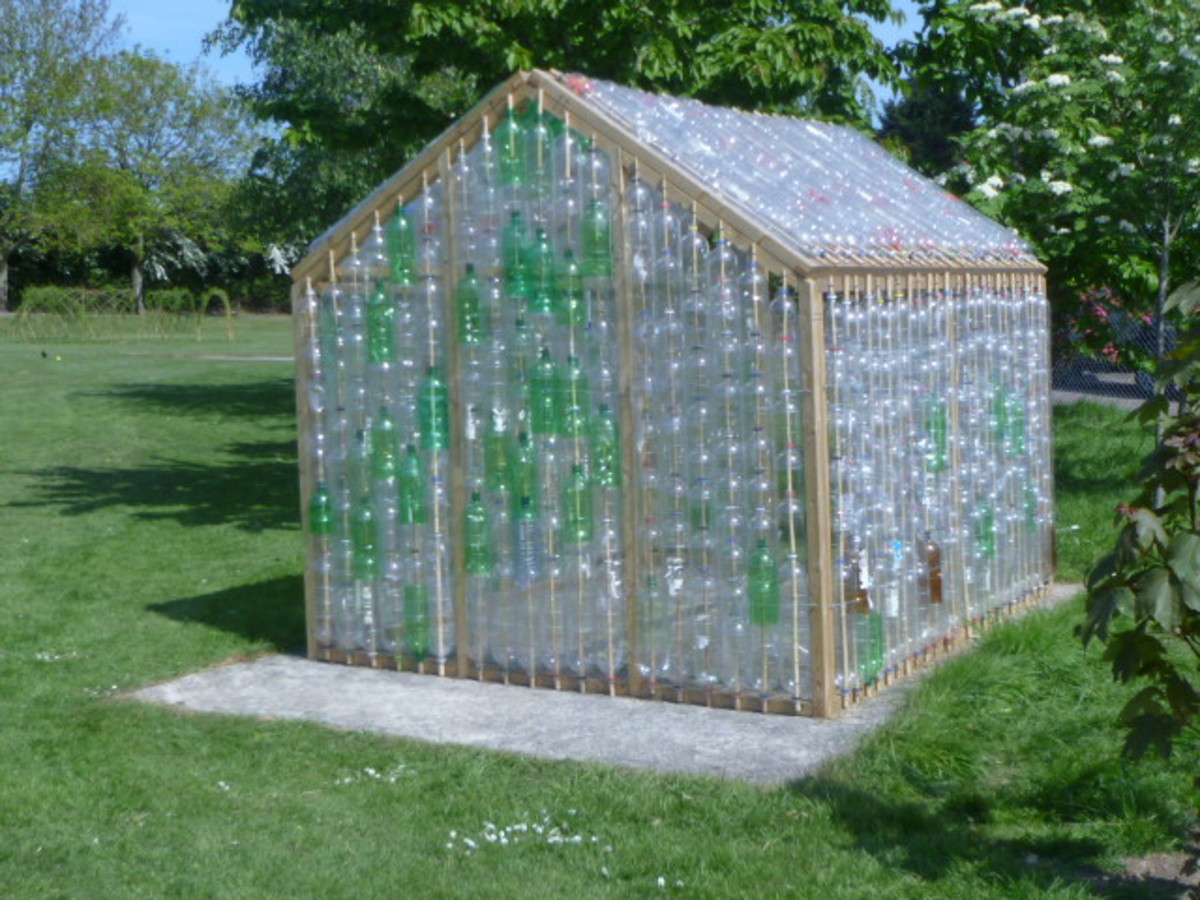
Plastic Bottle Greenhouse

This one is a bit more involved, but can bring the community together in order to achieve. Introducing the greenhouse made recycled plastic bottles.

This is a great project that a lot of schools have already implemented, and it can serve as the basis for a lot of future project and learning. While it is very simple, it reuses a lot of plastic trash in a great way. There are several videos and design ideas out there for these, so I just found the tutorial for it that I liked best. I like the idea of having these made each year, letting each class create their own design and reaching out to the community for their plastic bottles and materials. This would allow the use of older greenhouses while expanding the overall area the greenhouses covered. Of course the first one would not have any space until it was finished, so maybe it could be made larger with more focus on the design.

Garden Pots

Now that we have our compost bin, we need somewhere to put all of the soil we will be making. So here is a great idea for recycled planting pots.

These are simple and easy to mass produce, but still highly effective for getting plants started. This can also get parents, family, and businesses involved by having the students go around and collect the newspapers that would otherwise end up in the trash. These can also be made in different sizes, so they can be great as seed starters, or if made large enough they can be used to house adult plants. They can even be used to plant into a larger plot of soil as well, since if the rubber band is removed the newspaper will be able to break down and compost into the soil. Now if only we had a place to put our new planter pots filled with our compost soil. . .

Creating a Compost

I stumbled across a great project today while searching through Instructables. The first bin I found was pretty involved, but was a very professional looking compost bin.

There are several good pictures with easy to follow instructions, and several other users have completed the project. It requires some not as common tools and some difficult to set up hardware. If you are looking for an easier and more cost effective bin, I recommend the trash can compost bin.

This one is quite a bit easier to achieve, very simple and affordable, yet it is still just as effective as the more involved bin. While maybe not as pretty, this one would also be easier to reproduce and keep looking uniform. Both of these bins have been made by other users who have given some insight on the project as well. Of course, there are many more ideas out there for DIY compost bins, all you have to do is look for ones you like!

Create a free website or blog at WordPress.com.

Up ↑

Design a site like this with WordPress.com
Get started